Instagram Audio Downloader – Reels to MP3
Convert any Instagram Reel or video to MP3, or paste an audio link to download the sound.
How to download Instagram Reel audio as MP3
Three steps, about ten seconds. It works the same in any browser on iPhone, Android, Windows, and Mac.
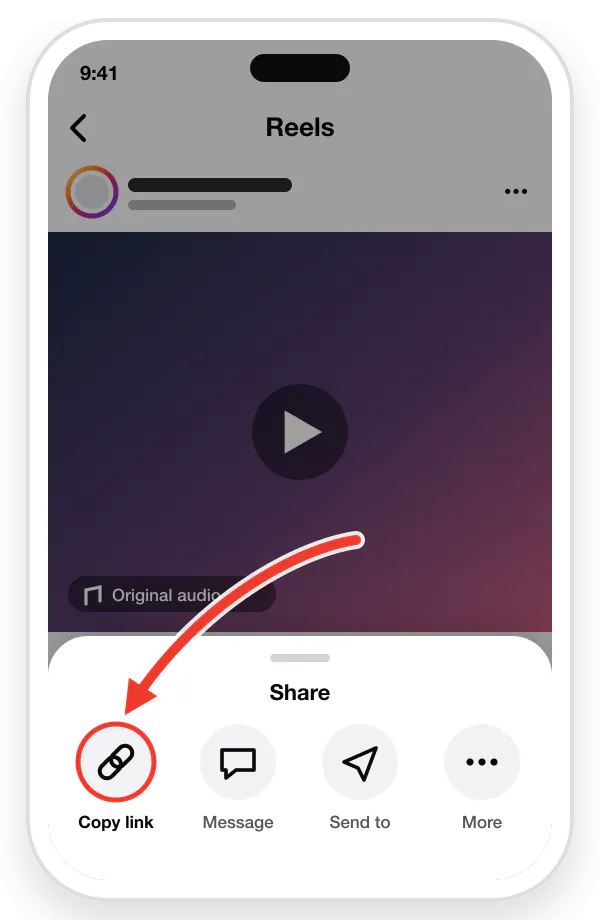
Copy the Reel or video link
In Instagram, tap the three dots (⋮) on the Reel or video, then tap "Copy Link".
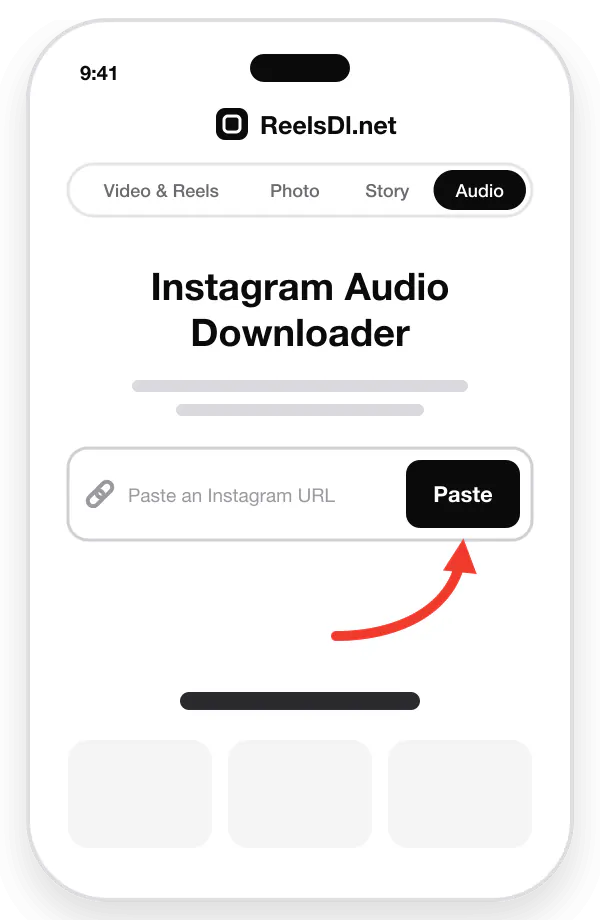
Paste the link
Paste the copied link into the box above, or tap the Paste icon.
Then press Enter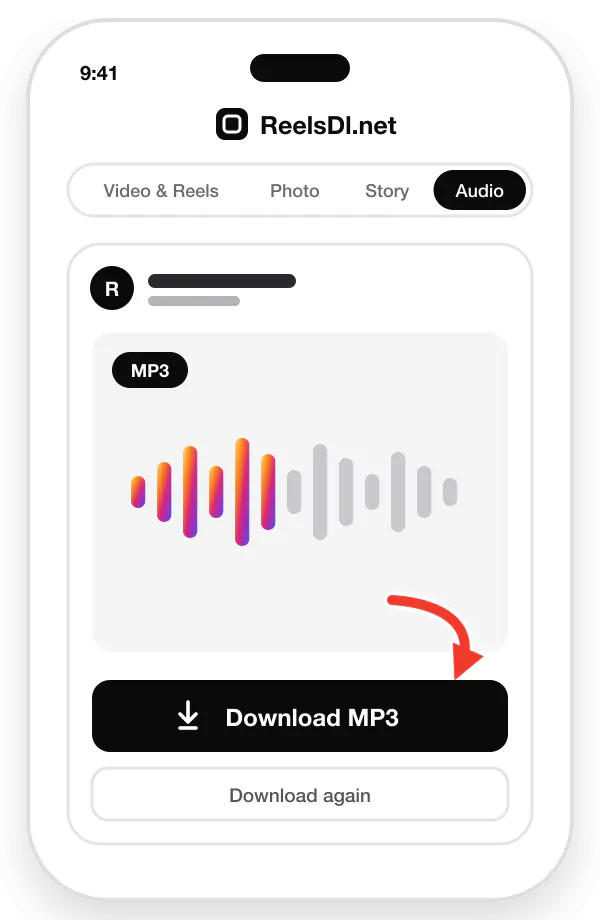
Download the audio
Wait a few seconds for the conversion, then click "Download Audio" to save the Reel audio as MP3.
The original audio track, without re-encoding
Instagram keeps a separate audio track for most Reels. The audio downloader streams that track straight to you as an M4A file, so nothing is converted and the sound is exactly what Instagram plays. It is quick, too: there is no video to download first.
When a Reel has no separate track, your browser takes the sound from the video and saves it as an MP3 instead. Both formats play on iPhone, Android, Windows, and Mac, and in apps like VLC, GarageBand, and CapCut.
Reel links and audio page links
You can paste either kind of link. A Reel or video link gives you that video's soundtrack, voice and music together, as you hear it in the Reel. An audio page link, which you get by tapping the sound name under a Reel and copying its link, gives you that sound on its own.
The audio is the full length of the Reel or video, not a preview. Silent Reels have nothing to save, and music that was removed for copyright reasons is not in the file either.
Using Reel audio
A saved track is handy as a ringtone, for practicing a dance or a voiceover, or to find a song you heard. Steps for ringtones and more are in how to extract audio from an Instagram Reel.
Most Reel music is licensed, so keep downloads for personal use. To use a sound in your own Reel, tap Use audio in Instagram instead: that keeps the licence and credits the original.
More Instagram downloaders
Same paste-and-save trick, different flavor. Pick your poison:
Instagram Video & Reels Downloader
For the Reel you have already rewatched 14 times.
Keep it forever as an HD MP4, sound and music included, no watermark, no "link in bio" treasure hunt.
You getHD MP4 fileOriginal soundNo watermarkSave the videoInstagram Photo & Carousel Downloader
Screenshots are a cry for help.
Full-resolution JPGs with no status bar, no cropped edges, and every carousel slide from a single link.
You getFull-size JPGEvery carousel slideZero croppingSave the photos
Only public posts and accounts are supported. Private, Close Friends, and deleted content stays protected by Instagram.
Instagram download guides
All guidesShort, practical walkthroughs for saving Instagram videos, photos, and audio on any phone or computer.
Frequently asked questions
Quick answers to what people ask most. Still stuck? Get in touch.
Can I convert an Instagram Reel or video into audio?
Yes. You can download Instagram Reels audio only, as an MP3. It is useful when you want the background song, music, or voice.
Enter the Reel or video link in the input box of the Instagram audio downloader and the tool gets the MP3 file for you.
How do I download the MP3 file?
Paste the Reel URL, then click the "Download Audio" button. The Reel audio MP3 file is saved to your Downloads folder.
The tool works on iPhone, Android, PC, and Mac. To save the video instead, use the Reels Downloader.
Can I paste a Reel video link or an audio link?
Both work. Paste the link of a public Reel or video post and the tool converts the video to an MP3 audio file.
Paste an Instagram audio link (/reels/audio/) and it downloads that sound as an MP3.
What quality is the Instagram MP3?
The MP3 is made from the audio track Instagram serves with the Reel, so it sounds the same as it does in the app. Instagram compresses audio on upload, so no tool can give you a studio-quality copy of the song.
Where is the MP3 saved on iPhone and Android?
On iPhone, Safari saves the MP3 in the Files app under Downloads. On Android, it goes to the Download folder, where music players such as VLC or Samsung Music can find it. On a computer, it is in your browser's Downloads folder.
Can I use Instagram Reel audio as a ringtone?
Yes. Download the Reel audio as an MP3, then add it as a ringtone in your phone settings. On iPhone the clip must be shorter than 30 seconds. The full steps are in how to extract audio from an Instagram Reel.
Why is my audio file an M4A and not an MP3?
Instagram keeps a separate audio track for most Reels. ReelsDl.net streams that track to you as it is, as an M4A, so nothing is re-encoded and the quality matches Instagram.
M4A plays on iPhone, Android, Windows, and Mac. Only when a Reel has no separate track is the sound converted to MP3 in your browser.
How long can the audio be?
As long as the Reel or video. A full-length Reel or a longer video post downloads with its whole soundtrack, not a preview clip.
Why does a Reel say it has no audio?
Some Reels are silent, or had their music removed for copyright reasons. If the Reel uses a sound from Instagram's library, try its audio page instead: tap the sound name in Instagram, copy that link, and paste it here.