# How to Save Instagram Photos Without Taking a Screenshot
Source: https://reelsdl.net/blog/save-instagram-photos-without-screenshot
Publisher: ReelsDl.net
Last updated: 2026-10-25
> Save Instagram photos and full carousels at the highest quality Instagram stores, with no screenshot. Works on phone, laptop, and PC, with no login.
## Key takeaways
- Instagram has no download button for photos, and the bookmark icon only saves a post inside the app.
- A link downloader returns the actual JPG at the largest size Instagram stores, typically 1080 pixels wide.
- One post link covers a whole carousel: every photo and video in it can be saved separately.
- No tool can produce a true 4K copy, because Instagram resizes photos on upload.
Instagram has no download button for photos. The fastest way to save one without a screenshot is to copy the post's link, paste it into the [Instagram photo downloader](https://reelsdl.net/photo), and save the JPG. You get the real image file at the largest size Instagram stores, and for carousel posts you get every slide.
## Why a screenshot is the worst option
A screenshot captures your screen, not the photo.
- **Lower resolution.** The image is only as large as it appears on your display, and portrait photos get shrunk to make room for the interface.
- **Cropping.** You have to cut away the username, like button, and caption by hand, and it is easy to shave off part of the picture.
- **One slide at a time.** A ten-photo carousel means ten screenshots and ten crops.
- **Extra compression.** The screenshot is saved again as a new image, which softens fine detail.
## The bookmark is not a download either
The **Save** icon under a post (the bookmark) adds it to your *Saved* collection inside Instagram. Nothing is stored on your phone. If the owner deletes the post or makes the account private, it disappears from your collection too.
| Method | Real image file | Full quality | Whole carousel | Works offline |
| --- | --- | --- | --- | --- |
| Screenshot | No | No | One slide at a time | Yes |
| Bookmark (Save) | No | — | Yes, in the app | No |
| Download by link | Yes | Yes | Yes | Yes |
## Save an Instagram photo by link
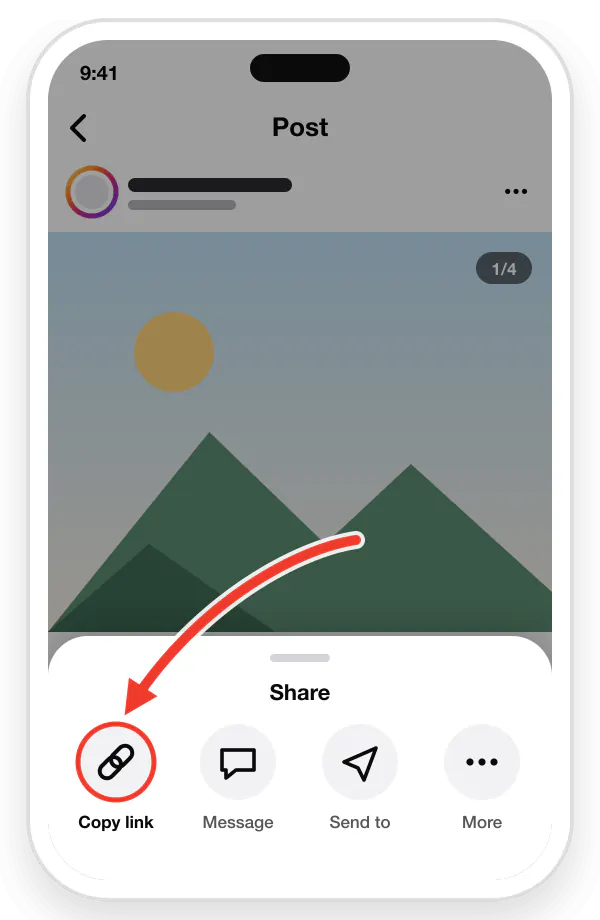
1. Open the post in Instagram. Tap the **three dots** at the top right and choose **Copy link** (or tap the share arrow, then *Copy link*).
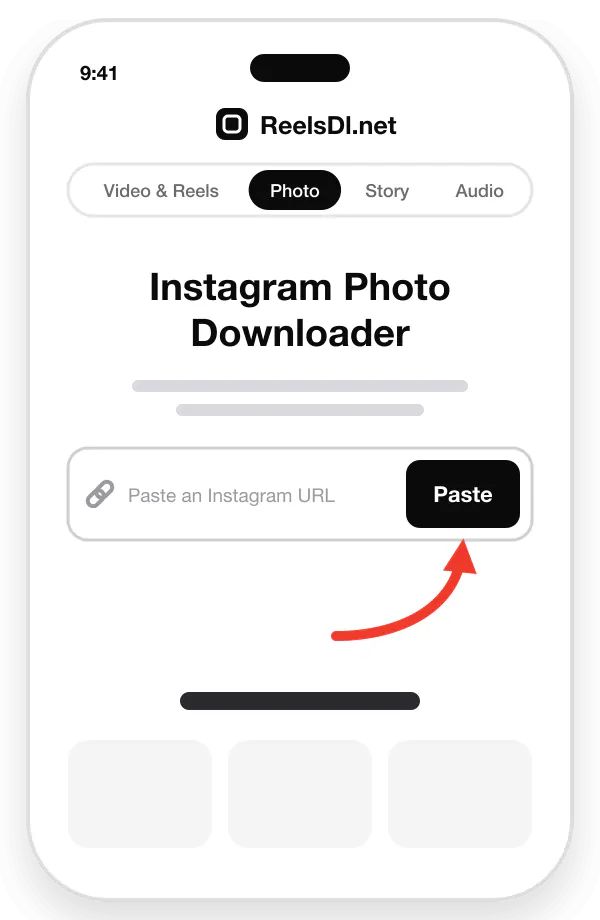
2. Open [reelsdl.net/photo](https://reelsdl.net/photo) in your browser.
3. Tap **Paste**, or paste the link into the box yourself. The post loads on its own.
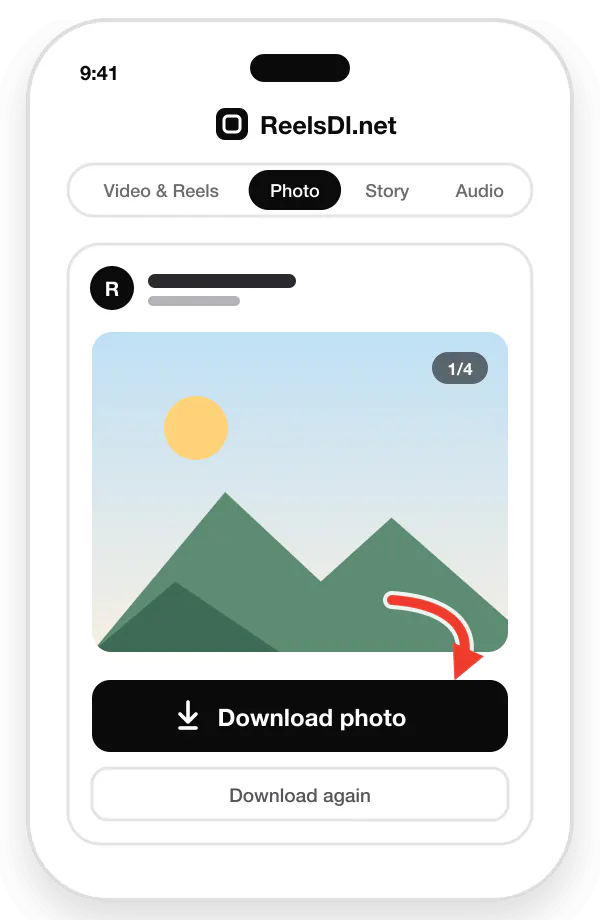
4. Tap **Download photo** under the preview.
Copy the linkPaste it hereDownload
### Getting it into your gallery
- **Android:** the JPG is saved to the *Download* folder, which shows up as an album in Google Photos and Samsung Gallery.
- **iPhone:** Safari saves to *Files → Downloads*. Open the image, tap **Share**, then **Save Image** to add it to Photos.
## Save every photo in a carousel
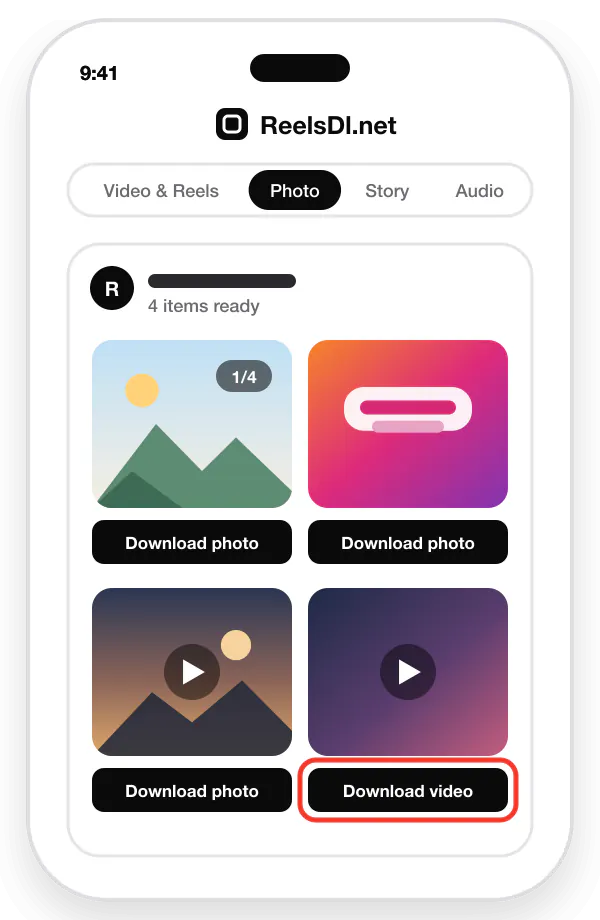
Carousels are where a downloader saves the most time. Paste the link of the post once and each slide appears as its own item, photos and videos alike, in the order they were posted. Download the ones you want or go through all of them.
Two things to know:
- **Copy the post link, not a slide.** One link covers the whole carousel.
- **Mixed posts work.** If a carousel has both photos and video clips, the photos save as JPG and the clips as MP4.
One carousel link lists every slide, each with its own button.
## Save Instagram photos on a laptop or PC
On a computer the process is the same, and finding the link is easier.
1. Open the post on **instagram.com**.
2. Copy the address from the browser's address bar. It looks like `instagram.com/p/…`.
3. Paste it into [reelsdl.net/photo](https://reelsdl.net/photo) and download.
The file goes to your Downloads folder. Right-clicking a photo on instagram.com does not offer *Save image as*, because the image sits behind other page elements. That is by design, and it is why a link downloader is the practical route on desktop. The full desktop walkthrough is in [how to download Instagram Reels on a laptop or PC](https://reelsdl.net/blog/download-instagram-reels-on-laptop-pc-mac).
## How good is the quality?
It is worth being precise here, because many sites promise "4K" or "HD original" photos.
Instagram does not keep your camera's original file for display. When a photo is uploaded, it is resized, typically to **1080 pixels wide**, and compressed. Portrait posts are stored taller (for example 1080 × 1350), landscape posts shorter.
A link downloader returns the **largest version Instagram serves**. That is the ceiling. No tool can recover detail that Instagram discarded on upload, and a "4K" download is the same image stretched. If you need the true original, the only source is the person who took the photo.
## Saving your own photos
If the photos are yours, you have better options than any downloader:
- **Going forward:** in Instagram, open *Settings* and turn on **Save original photos** (under the archiving and downloading options). Instagram then keeps a copy on your phone of everything you post.
- **Everything you have ever posted:** open *Accounts Center → Your information and permissions → Download your information*. Instagram prepares an archive of your photos, videos, and captions and sends you a link.
## What you cannot save
- **Private accounts.** Posts from private accounts are not reachable by link, even if you follow the account.
- **Deleted or archived posts.** Once a post is gone from the profile, the link stops working.
- **Photos sent in direct messages.** These are private by nature. Disappearing photos in DMs also notify the sender if you screenshot them.
## Respect the photographer
A photo on a public profile is still the property of whoever took it. Saving it for reference or inspiration is common. Publishing it on your own account, a website, or in an ad needs the owner's permission, and a credit in the caption is the minimum courtesy when they say yes.
## Frequently asked questions
### Can you save photos from Instagram without a screenshot?
Yes. Copy the link of a public post, paste it into ReelsDl.net, and download the JPG. You get the image file itself, without the app's buttons or caption on top.
### How do I save all the photos from an Instagram carousel?
Copy the link of the carousel post and paste it into ReelsDl.net. Every photo and video in the post is listed, and each one has its own download button.
### Can I download Instagram photos in 4K?
No tool can. Instagram resizes photos when they are uploaded, typically to 1080 pixels wide, and that is the largest version that exists. A downloader that promises 4K is only enlarging the same image.
### Does Instagram notify someone when you save their photo?
No. Instagram does not notify the owner when a post is saved to a collection, downloaded by link, or screenshotted. Screenshot alerts apply only to disappearing photos and videos sent in direct messages.
### How do I save my own Instagram photos to my phone?
Turn on Save original photos in Instagram's settings to keep a copy of everything you post from now on. For older posts, use Download your information in Accounts Center to export your whole archive.