# How to Download Instagram Videos and Reels on Android
Source: https://reelsdl.net/blog/download-instagram-videos-on-android
Publisher: ReelsDl.net
Last updated: 2026-10-29
> Save any public Instagram video or Reel to your Android gallery in HD, with sound and no watermark. Works in Chrome or Samsung Internet, with no app.
## Key takeaways
- On Android, a downloaded Instagram video goes to the Download folder and shows up in Gallery or Google Photos on its own.
- Chrome, Samsung Internet, Firefox, and Edge all work. No app or APK is needed.
- Downloading by link saves the original MP4 with sound, without Instagram's watermark.
- If a video is not in your gallery, open the Files app and look in Downloads.
To download an Instagram video on Android, copy its link in the Instagram app, paste it into the [Instagram video downloader](https://reelsdl.net/) in Chrome, and tap **Download video**. The MP4 is saved to your phone's *Download* folder and appears in Gallery or Google Photos a few seconds later, with its sound and without a watermark. No app is needed.
## What the Instagram app lets you do on Android
Instagram gives you three ways to keep a video, and none of them gives you a clean file:
- **The Download option** in the share menu only appears on public Reels whose creators allow it. The saved video carries the Instagram logo and the creator's username, and some Reels save without their music.
- **Save (the bookmark)** only adds the post to a collection inside Instagram. Nothing is stored on your phone, and the post disappears if the owner deletes it.
- **The screen recorder** in your quick settings records your screen, the app interface, and any notifications that arrive, in real time and at screen resolution.
Downloading by link skips all of that. You get the MP4 Instagram itself streams, in the best quality it offers, in a few seconds.
## Step 1: Copy the video link
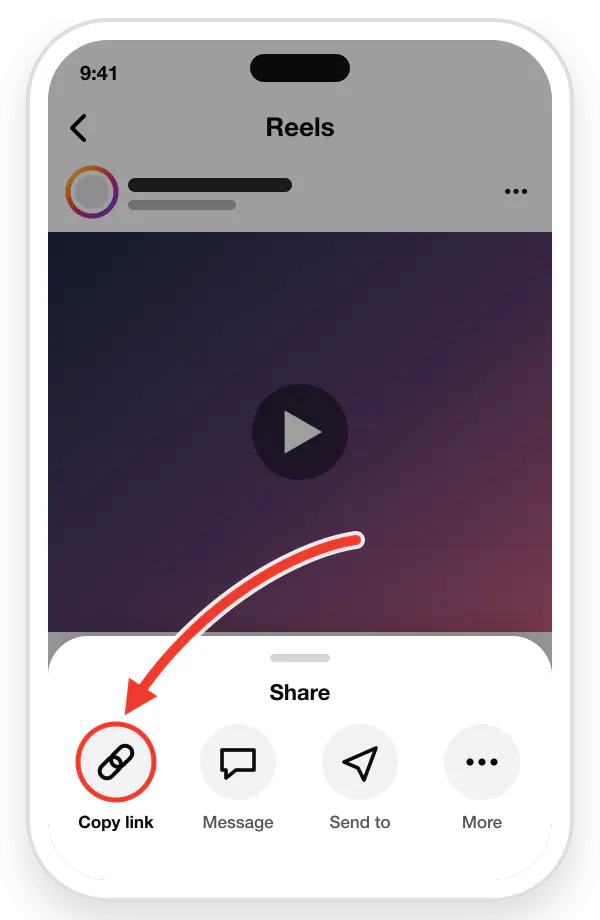
1. Open the Reel or video in the Instagram app.
2. Tap the **Share** arrow (paper plane), or the **three dots**.
3. Tap **Copy link**.
The link looks like `instagram.com/reel/…` for a Reel or `instagram.com/p/…` for a video post. Both work, and so do older IGTV links with `/tv/`.
Copy the link
## Step 2: Paste it into the downloader
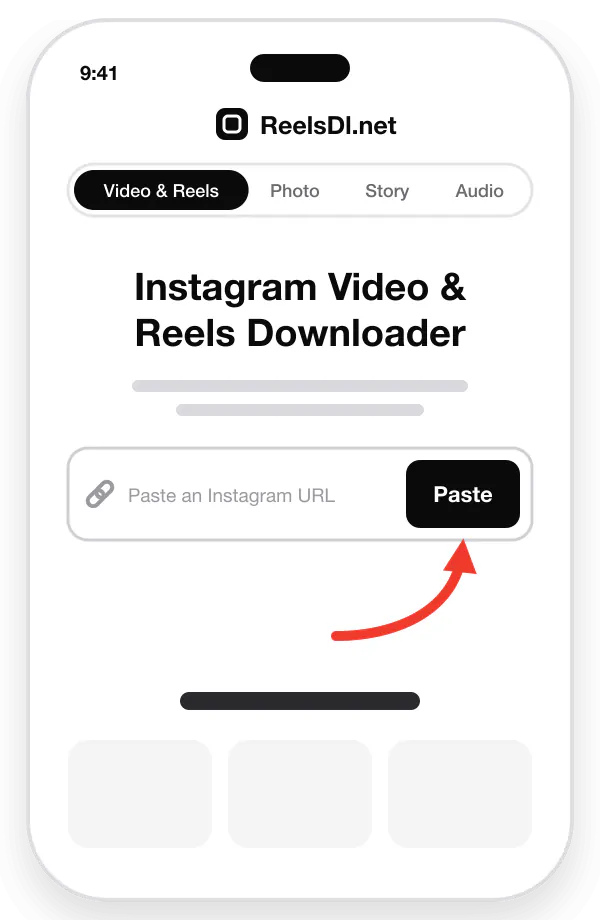
1. Open **Chrome** (or any browser) and go to [reelsdl.net](https://reelsdl.net/).
2. Tap the **Paste** button next to the input box, or long-press the box and choose **Paste**.
3. The preview appears after a second or two.
Paste it here
## Step 3: Download and open it in your gallery
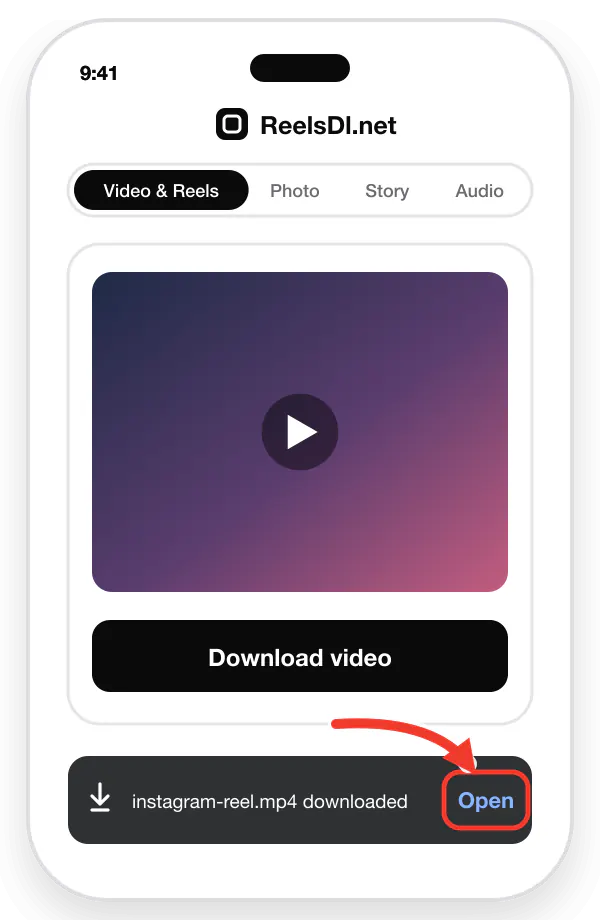
1. Tap **Download video**.
2. Chrome shows *Download complete* at the bottom of the screen, with an **Open** button.
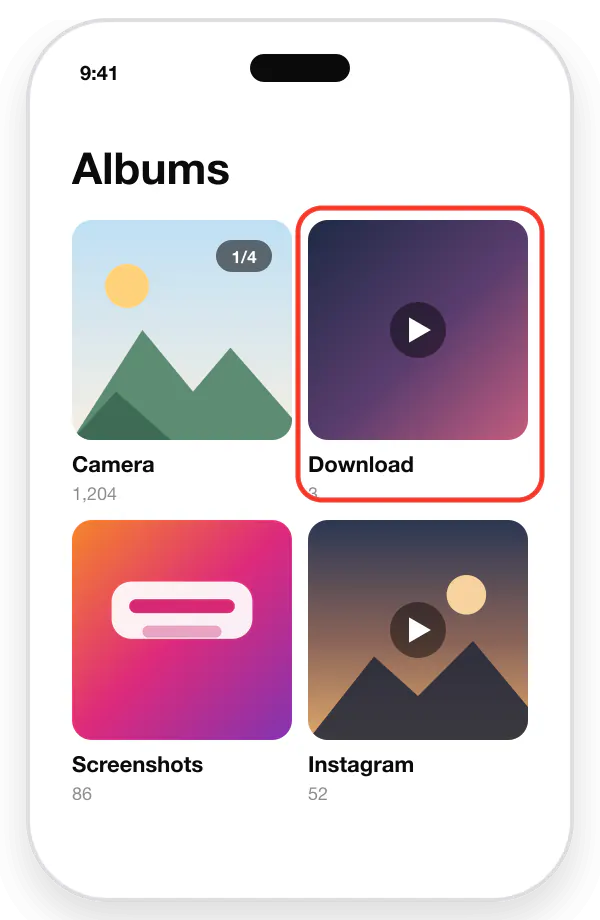
3. Open **Gallery** or **Google Photos**. The video is in the *Download* album, ready to watch offline, trim, or share.
Chrome confirms the download. Tap Open.It also appears in the Gallery's Download album.
## Samsung Internet, Firefox, and other browsers
Every Android browser saves to the same *Download* folder by default. Only the place you check on progress differs:
| Browser | Where to see the download |
| --- | --- |
| Chrome | Notification bar, or ⋮ menu → **Downloads** |
| Samsung Internet | Notification bar, or ≡ menu → **Downloads** |
| Firefox | Notification bar, or ⋮ menu → **Downloads** |
| Edge, Opera, Brave | Notification bar, or the browser menu → **Downloads** |
If you changed your browser's download location, the file is in that folder instead. Your gallery app may need a moment to scan it.
## Saving Reels, carousels, Stories, and audio
The same three steps work for every public format, with a dedicated page for each:
| You want | Use | Saved as |
| --- | --- | --- |
| A Reel, video post, or IGTV video | [Instagram Reels downloader](https://reelsdl.net/) | MP4 with sound |
| Photos or a whole carousel | [Photo downloader](https://reelsdl.net/photo) | JPG |
| A Story or Highlight | [Story downloader](https://reelsdl.net/stories) | MP4 or JPG |
| Only the song or voice | [Audio downloader](https://reelsdl.net/audio) | MP3 |
For a carousel, paste the post link once and every slide gets its own download button.
## Troubleshooting on Android
**The video is not in Gallery.** Open the **Files** app (or *My Files* on Samsung) and go to *Downloads*. If it is there, your gallery app has not scanned the folder yet; restart the app. In Google Photos, look under *Collections → On this device* for the *Download* folder.
**The download fails or never finishes.** Check that you have free storage space and a stable connection, then tap **Download video** again. Long videos take a few seconds longer than short Reels.
**The video plays without sound.** Android has separate ring and media volumes. Press a volume key while the video plays to raise media volume. If it is still silent, Instagram may have muted the music for copyright reasons, which affects every copy of that Reel. More fixes are in [Reels not saving to your camera roll](https://reelsdl.net/blog/instagram-reels-not-saving-to-camera-roll).
**"We could not fetch that link."** The account is private, the post was deleted, or the link was copied incompletely. Open the link in a private Chrome tab: if Instagram asks you to log in to see it, it cannot be downloaded.
## Make it one tap next time
In Chrome, open the ⋮ menu on reelsdl.net and choose **Add to Home screen** or **Install app**. The downloader then opens like an app from your home screen, with no Play Store download and no permissions. You can then copy a link in Instagram, tap the icon, and tap Paste.
## Use downloads responsibly
Saving a video to watch offline is personal use. Re-uploading someone else's Reel, or using it in your own videos, needs the creator's permission. [Is it legal to download Instagram Reels?](https://reelsdl.net/blog/is-it-legal-to-download-instagram-reels) explains where the line is.
## Frequently asked questions
### Where do downloaded Instagram videos go on Android?
Into the Download folder in your phone's internal storage. Samsung Gallery, Google Photos, and most gallery apps list it within a few seconds, often in an album called Download. You can also open it from the Files app under Downloads.
### Do I need an app to download Instagram Reels on Android?
No. Any browser works: Chrome, Samsung Internet, Firefox, or Edge. Avoid APK files from outside the Play Store and apps that ask for your Instagram password.
### Why does my downloaded Instagram video have no sound on Android?
Check that media volume is up, not only ring volume. If it is still silent, Instagram may have muted the music in that Reel for copyright reasons, which affects every copy of it.
### Can I download Instagram videos on Android without Chrome?
Yes. Samsung Internet, Firefox, Edge, Opera, and Brave all download the file the same way. Only the download notification looks different.
### How do I download Instagram Stories on Android?
Copy the Story link from the three dots menu and paste it into the ReelsDl.net Story downloader. Public Stories save as MP4 or JPG, and the owner is not notified.